Translate

Tuesday, January 24, 2023

Jms Sender code that sends message to JMS topic ( Weblogic ) + Linux

TopicSender.java :


import javax.jms.*;

import javax.naming.*;


public class TopicSender {

  public static void main(String[] args) throws Exception {

    // Obtain a JNDI connection using the WebLogic JNDI provider

    InitialContext ic = new InitialContext();


    // Look up the JMS topic

    Topic topic = (Topic) ic.lookup("e.test_topic");


    // Look up a JMS connection factory

    ConnectionFactory cf = (ConnectionFactory) ic.lookup("jms/RegistryTopicConnectionFactory");


    // Create a JMS connection

    Connection connection = cf.createConnection();


    // Create a JMS session

    Session session = connection.createSession(false, Session.AUTO_ACKNOWLEDGE);


    // Create a JMS message producer

    MessageProducer producer = session.createProducer(topic);


    // Create a JMS text message

    TextMessage message = session.createTextMessage("Hello, JMS! This is a Test Message");


    // Send the message

    producer.send(message);


    System.out.println("\n ----- Jms Message Posted Successfully! -----");


    // Close the JMS resources

    producer.close();

    session.close();

    connection.close();

  }

}


run_eventPost.sh


cat run_eventPost.sh

#. .$DOMAIN_HOME/bin/setDomainEnv.sh

export CLASSPATH=$CLASSPATH:/appbin/weblogic/MW_14110/wlserver/server/lib/wlthint3client.jar

#export CLASSPATH=$CLASSPATH:/appbin/weblogic/MW_14110/wlserver/server/lib/weblogic.jar


java -Djava.naming.factory.initial=weblogic.jndi.WLInitialContextFactory -Djava.naming.provider.url=t3s://maisjmsdev1c.awspriv.stanford.edu:7004 -Djms.queue.jndiName=jms/e.test_topic -Djms.connectionFactory.jndiName=jms/RegistryTopicConnectionFactory -Dweblogic.security.SSL.ignoreHostnameVerification=true TopicSender


#### -------->  url=t3s://maisjms-dev2-nlb.stanford.edu:7004 :


#java -Djava.naming.factory.initial=weblogic.jndi.WLInitialContextFactory -Djava.naming.provider.url=t3s://maisjms-dev2-nlb.stanford.edu:7004 -Djms.queue.jndiName=jms/e.test_topic -Djms.connectionFactory.jndiName=jms/RegistryTopicConnectionFactory -Dweblogic.security.SSL.ignoreHostnameVerification=true TopicSender


#### --------> t3s://localhost :


#java -Djava.naming.factory.initial=weblogic.jndi.WLInitialContextFactory -Djava.naming.provider.url=t3s://localhost:7004 -Djms.queue.jndiName=jms/e.test_topic -Djms.connectionFactory.jndiName=jms/RegistryTopicConnectionFactory TopicSender


#### -------> t3s://maisjmsdev1c.stanford.edu:7004 :


#java -Djava.naming.factory.initial=weblogic.jndi.WLInitialContextFactory -Djava.naming.provider.url=t3s://maisjmsdev1c.stanford.edu:7004 -Djms.queue.jndiName=jms/e.test_topic -Djms.connectionFactory.jndiName=jms/RegistryTopicConnectionFactory TopicSender


Thanks,

Srikanth Govada


Sunday, August 1, 2021

JVM Troubleshooting -


Lesson 1-1: Automatic Memory Management


https://www.youtube.com/watch?time_continue=268&v=nPSOAy4udfE
Lesson 1-2: Generational Garbage Collection and Memory Spaces in the HotSpot JVM
https://www.youtube.com/watch?v=9Z3EkWW-my8
Lesson 1-3: Garbage Collectors in the HotSpot JVM
https://www.youtube.com/watch?v=rrvAA615jPU 


Friday, March 17, 2017

Learning Linux (A2Z)

Learning Linux (A2Z)


Most of the people are trying to learn Linux but they fail due to no direction to follow. Here is an directions to follow and learn Linux.

## Basics ##


1.      Introduction to Linux -- http://bit.ly/Introcudtion_to_Linux
2.      Linux Architecture -- http://bit.ly/Linux_Architecture
3.      Windows Vs Linux Comparison -- http://bit.ly/Windows_Vs_Linux
4.      Bash Shell features -- http://bit.ly/bash_shell
5.      Linux Directory Structure -- http://bit.ly/Linux_Directory_structure
6.      Linux Boot Process Detailed explanation - http://bit.ly/LinuXboot_process
7.      Basic and Common Commands - http://bit.ly/Basicommands
8.      All Linux Commands with there description - http://bit.ly/Linux_commands
25 Linux commands - http://bit.ly/29ZhNDn

#### System Administration Topics ##


9.      Linux Text Editors - http://bit.ly/Text_Editors
10.  Linux Operating System Installation - http://bit.ly/Linux_OS_Installation
11.  User Profile Management - http://bit.ly/User_Profile_management
12.  User Administration (User Creation, Modification and deletion) –
14.  Access Control List - http://bit.ly/29Md71v
15.  Head, Sort, Tail, Uniq, Paste, Cut, Tr, Sed and diff commands with examples - http://bit.ly/String_commands
16.  Soft Link Vs Hard Link - http://bit.ly/Soft_vs_hard_link
17.  Search related commands Grep, find and locate - http://bit.ly/search_commands
18.  Task Automation using crontab and at - http://bit.ly/Linux_crontab Crontab job schedules - http://bit.ly/29Metcy
19.  File system and Creating Standard partitions - http://bit.ly/Creating_partition
20.  Logical Volume Manager (LVM - Part1) - http://bit.ly/Linux_LVM
21.  Logical Volume Manager (LVM - Part2) - http://bit.ly/Linux_LVM2
22.  Disk quota management - http://bit.ly/Disk_quota
23.  RPM / YUM - http://bit.ly/Linux_YUM
24.  All RAID Levels explained - http://bit.ly/RAID_Levels
25.  Creating and Managing Software RAID - http://bit.ly/Manage_RAID

## Advanced System Administration ##


26.  Neworking installing and configuring the Network Card - http://bit.ly/Linux_networking
27.  Configuring EPEL Repository - http://bit.ly/2a0lQCh
28.  Network File System (NFS) - http://bit.ly/29Q7Tp7
29.  Samba Server (SMB) - http://bit.ly/2ajNVAs
30.  File Transfer Protocol (FTP) - http://bit.ly/29Q6G1h
31.  Web Server / Apache (HTTPD) - bit.ly/2a7lnxB
32.  Mail Server configuration (SMTP) - http://bit.ly/1QopUJy
33.  DHCP Server installation and configuration - http://bit.ly/29RMzip
34.  Master DNS Server installation and configuration - http://bit.ly/29FbQtF
35.  LDAP Client with AutoFS - http://bit.ly/29FbQtF
36.  Open LDAP Server installation - http://bit.ly/29Ye4qZ
37.  SELinux Security - http://bit.ly/2a0lagi
38.  SQUID Proxy Server - http://bit.ly/2a0lewB
39.  MariaDB Installation - http://bit.ly/29RO1Rw
40.  Recovering ROOT Password - http://bit.ly/29LZW1S
41.  Secure Web Server Linux - http://bit.ly/2a2mTON
42.  Local YUM Server configuration - http://bit.ly/1lpfjBm
43.  PXE Boot Server installation and configuration - http://bit.ly/29LmApa
44.  Process Management - http://bit.ly/1kW70fO
45.  Creating Secret Web Server - http://bit.ly/29MWTI4
46.  Creating Multi User Samba Share - http://bit.ly/2a2nC2w
47.  Linux Boot Process - http://bit.ly/2a7mOMM
48.  Swap File System - http://bit.ly/29RO00j
49.  Firewalld configuration - http://bit.ly/29M0zbE
50.  Kerberized NFS Shares - http://bit.ly/29RNZt0
51.  Installation and Configuration NTP - http://bit.ly/29LR5kK
52.  Setup Your Own Linux Lab - http://bit.ly/29LnWAf

## Interview Questions and Answers ##

53.  Interview questions and answers - Part 1- http://bit.ly/1NRnpMv
54.  Interview questions and answers - Part 2 - http://bit.ly/1NtRXp9
55.  Interview questions and answers - Part 3 - http://bit.ly/1Sr7juF

## File system error resolution ##

56.  mount: Argument list too Long - http://bit.ly/1Lg4qqm
57.  ## Download E-Books - http://bit.ly/29Q6WwW
57. ## A Complete RHCSA and RHCE course content - http://bit.ly/2a2nxvC

Tuesday, March 1, 2016

Inconsistent security configuration Cannot Convert Identity Certificate

<07-Aug-2013 13:52:53 o’clock UTC> <Notice> <Security> <BEA-090171> <Loading the identity certificate and private key stored under the alias soa from the JKS keystore file /u01/app/oracle/admin/domain/dev/config/fmwconfig/soa.jks.> 
<07-Aug-2013 13:52:53 o’clock UTC> <Error> <WebLogicServer> <BEA-000297> <Inconsistent security configuration, java.lang.RuntimeException: Cannot convert identity certificate>
<07-Aug-2013 13:52:53 o’clock UTC> <Error> <Server> <BEA-002618> <An invalid attempt was made to configure a channel for unconfigured protocol “Cannotconvert identity certificate”.>


Root Cause : This issue could be because of many reasons
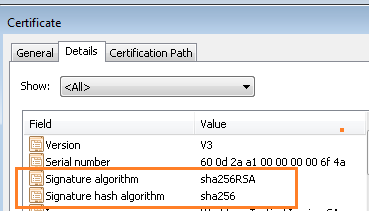
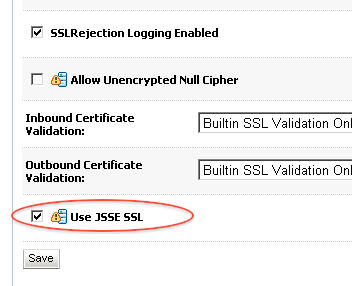
1. SHA as HASH ALgorithm : If while signing the Certificate, signature hash algorithm used by CA is SHA256 (to find Algorithm, click certificate and thenDetails) then this is supported only on WebLogic 10.3.3 or higher version (for prior version of WebLogic use SHA1). For WebLogic 10.3.3 or higher with SHA256, select option Use JSSE SSL in SSL tab


Fix:  Use option Use JSEE SSL
Servers -> [name_of_the_weblogic_server_for_which_ssl_is_configured] ->Configuration -> SSL (sub tab) : Click on Advanced at bottom of the Page , select check box Use JSSE SSL and then save . Activate Change and restart WebLogic Server.


2. Other reason could be use of wildcard (*.domain_name) in SSL certificate .

Reference
  • 664243.1 E-WL: WebLogic Fails to Listen on SSL Port after Installing a WildCard Certificate or a SHA2 Certificate. Logs Message: “Cannot convert identity certificate”
Thanks,
Srikanth Govada

Wednesday, February 10, 2016

Encrypt/Decrypt Weblogic Server Password..

Encrypt WLS Password - 

  1. Change directory to your domain's bin folder (For Eg. cd c:\bea\user_projects\domains\mydomain\bin)
  2. Execute the setDomainEnv script (For Eg. setDomainEnv.cmd)
  3. Execute java weblogic.security.Encrypt which will prompt for the password and will print the encrypted value in stdout.
The following are some sample output from running the utility

-bash-4.1$ java weblogic.security.Encrypt
Password: *****
{AES}x2TMt6AIrZlpkfiqdV1l2vubITipFV60rAexEz+rCco=

C:\bea\user_projects\domains\mydomain>java weblogic.security.Encrypt testpwd
{3DES}9HWsf87pJTw=

You can also use WLST to encrypt clear text strings as below:

C:\bea\user_projects\domains\mydomain>java weblogic.WLST

Initializing WebLogic Scripting Tool (WLST) ...

Welcome to WebLogic Server Administration Scripting Shell

Type help() for help on available commands

wls:/offline> es = encrypt('wbstg2014')
wls:/offline> print es
{3DES}9HWsf87pJTw=
wls:/offline>


Sooner or later while we deal with Weblogic. We may face the situation where you do not remember or recollect the weblogic Admin/Server passwords.

Lets us see how to decrypt the password -

Step 1 -  Navigate to domain/bin

Ex - cd /opt/middleware/oracle/oracle_WL_Home/user_projects/domains/comcast_domain/bin

Run   . ./setDomainEnv.sh


Step2:       Copy the following into a file and save it as decrypt.py (click here to download the file)

import os
import weblogic.security.internal.SerializedSystemIni
import weblogic.security.internal.encryption.ClearOrEncryptedService

def decrypt(domainHomeName, encryptedPwd):
    domainHomeAbsolutePath = os.path.abspath(domainHomeName)
    encryptionService = weblogic.security.internal.SerializedSystemIni.getEncryptionService(domainHomeAbsolutePath)
    ces = weblogic.security.internal.encryption.ClearOrEncryptedService(encryptionService)
    clear = ces.decrypt(encryptedPwd)
    print "Decrypted Password:" + clear

try:
    if len(sys.argv) == 3:
        decrypt(sys.argv[1], sys.argv[2])
    else:
        print "INVALID ARGUMENTS"
        print " Usage: java weblogic.WLST decryptPassword.py <DOMAIN_HOME> <ENCRYPTED_PASSWORD>"
        print " Example:"
        print "    java weblogic.WLST decryptPassword.py D:/Oracle/Middleware/user_projects/domains/base_domain {AES}819R5h3JUS9fAcPmF58p9Wb3syTJxFl0t8NInD/ykkE="
except:
    print "Unexpected error: ", sys.exc_info()[0]
    dumpStack()
    raise


Step3 -

copy this file into $domain/security Dir as script needs to access serializedSystemIni and other ldif files in this directory.

Step 4 -

Step4:
     Execute the following command

Syntax:
    java  weblogic.WLST  decrypt.py  . encrypted_password_from_boot.properties

Example:
    java  weblogic.WLST  decrypt.py  . {3DES}H6HVU9HWbD8AD2BHQajnEA==

Note - You need to input the correct encrypted password ( read it from boot.properties) else you will see below issues..

Unexpected error:  weblogic.security.internal.encryption.EncryptionServiceException

Problem invoking WLST - Traceback (innermost last):
  File "/opt/middleware/scripts/decrypt.py", line 14, in ?
  File "/opt/middleware/scripts/decrypt.py", line 9, in decrypt
    at weblogic.security.internal.encryption.JSafeEncryptionServiceImpl.decryptBytes(JSafeEncryptionServiceImpl.java:141)
    at weblogic.security.internal.encryption.JSafeEncryptionServiceImpl.decryptString(JSafeEncryptionServiceImpl.java:189)
    at weblogic.security.internal.encryption.ClearOrEncryptedService.decrypt(ClearOrEncryptedService.java:99)
    at sun.reflect.NativeMethodAccessorImpl.invoke0(Native Method)
    at sun.reflect.NativeMethodAccessorImpl.invoke(NativeMethodAccessorImpl.java:62)
    at sun.reflect.DelegatingMethodAccessorImpl.invoke(DelegatingMethodAccessorImpl.java:43)
    at java.lang.reflect.Method.invoke(Method.java:497)

weblogic.security.internal.encryption.EncryptionServiceException: weblogic.security.internal.encryption.EncryptionServiceException: com.rsa.jsafe.JSAFE_PaddingException: Invalid padding.


Method 2 : 

Below steps can be followed to Decrypt the Passwords in Weblogic.

source $DOMAIN_HOME/bin/setDomainEnv.sh

cd $DOMAIN_HOME/security 
 
 
Please create a file called plainpassword.py with the below contents and save the file.
 
from weblogic.security.internal import *  
from weblogic.security.internal.encryption import *

encryptionService = SerializedSystemIni.getEncryptionService(".")  
clearOrEncryptService = ClearOrEncryptedService(encryptionService)

passwd = raw_input("Enter encrypted password of one which you wanted to decrypt : ")

plainpwd = passwd.replace("\\", "")

print "Plain Text password is: " + clearOrEncryptService.decrypt(plainpwd) 
 
 
 Run the below command to decrypting the password. Enter the encrypted password when prompted.

java weblogic.WLST plainpassword.py  
Initializing WebLogic Scripting Tool (WLST) ...  
Welcome to WebLogic Server Administration Scripting Shell  
Type help() for help on available commands  
Enter encrypted password of one which you wanted to decrypt : {AES}LsGaddassssvQDyibmejXFkf1tWxyndNArAhZ3M5GcnjXWUpJs=  
Plain Text password is: Welcome1234 
 
 
Using this way we can decrypt the encrypted password from boot.propertis
 and db schema passwords stored data source xml files on 
$DOMAIN_HOME/config/jdbc and also we can decrypt the NM password which 
is on config.xml.
 
Thanks,
Srikanth Govada
Step1:
    Open a command prompt and navigate to the domain bin

user_projects/DOMAIN_HOME/bin - See more at: http://middleware7.blogspot.com/2012/09/how-to-decrypt-weblogic-password.html#sthash.QWAGMaTn.dpuf

Friday, February 5, 2016

Steps to create a new domain on Weblogic Server 12.1.2.0.0...


 Note -


Prior to running the Configuration Wizard to create a domain on a UNIX or Linux operating system, if you have not already done so, set the CONFIG_JVM_ARGS environment variable as follows:
-Djava.security.egd=file:/dev/./urandom
This decreases the amount of time it takes for the Configuration Wizard to create or update a domain
Quick Start Configuration Wizard can be used only to configure the various sample domains, such as MedRec and the Examples Server, in your WebLogic Server installation.The Quick Start Configuration Wizard supports only the Derby (JavaDB) database driver. If you are using another database, you cannot use the Quick Start Configuration Wizard to create your domain. 
- You can start Quick Start Configuration Wizard in two ways :
1. Select the Automatically Launch Quick Start Configuration Wizard option on the Installation Complete screen of the WebLogic Server installer.
2. Run the config.cmd / config.sh script located in ORACLE_HOME/oracle_common/common/bin as follows : " config.cmd -target=config-oneclick " in windows and " config.sh -target=config-oneclick " in Linux.
- Prior to manually running the Configuration Wizard in Quick Start mode, you must set the CONFIG_JVM_ARGS environment variable to specify the full path and JAR file name for each template that you want to use for the domain.
To set CONFIG_JVM_ARGS on a Windows system:
set CONFIG_JVM_ARGS="-DuserTemplates=C:/Oracle/Middleware/wlserver/common/
templates/wls/wls.jar,C:/Oracle/Middleware/wlserver/common/templates/
wls/wls_webservice_jaxws.jar"
To set CONFIG_JVM_ARGS on a UNIX:
export CONFIG_JVM_ARGS="-DuserTemplates=/Oracle/Middleware/wlserver/common/
templates/wls/wls.jar,/Oracle/Middleware/wlserver/common/templates/
wls/wls_webservice_jaxws.jar"


Example -

export CONFIG_JVM_ARGS="-Djava.security.egd=file:/dev/urandom -DuserTemplates=/opt/middleware/oracle/oracle_WL_Home/wlserver/common/templates/wls/wls.jar"

Steps to create a new WLS 12.1.2.0.0 domain :

Step 1 :

- After installing Weblogic server, you can check/select " Automatically Launch the Configuration Wizard " and finish the installation. This would automatically start the configuration Wizard.

- You can also start the Configuration Wizard using config script located at :
On Windows: <MWHOME>\oracle_common\common\bin\config.cmd  ( OR " choose Start > All Programs > Oracle > Oracle Home > WebLogic Server version > Tools > Configuration Wizard. " )
On UNIX: <MWHOME>/oracle_common/common/bin/config.sh


Note :
- If you have a WLS zip installer then you need to use the configure.sh script to create a basic domain instead of the config.sh script.
Even though the config.sh script is present it will not work.
- When you run the config.cmd or config.sh command, the following error message might be displayed to indicate that the default cache directory is not valid:
*sys-package-mgr*: can't create package cache dir
You can change the cache directory by including the -Dpython.cachedir=valid_directory option in the command line.
To create a log file of the Configuration Wizard session, include the -log=config.log -log_priority=debug parameter in the command. You can specify any file name for the log file, such as config_today.log. The log file is stored in the logs directory of the Oracle Middleware home directory.
- If you cannot use GUI mode then Oracle recommends to use WLST to create a new or extended domain. 

Step 2 :


Step 3 :

- There are three template categories that you can choose from :
* All Templates ( Default )
* Oracle
* Oracle weblogic Server and Coherence


Step 4 :


Step 5 :


Step 6 :


- You now have an option to configure nodemanager in the configuration wizard.
- Nodemanager can be configured at the domain level or machine level.
- By default nodemanager would be configured at the domain level.


Step 7 :


Step 8 :


Step 9 :


Thursday, February 4, 2016

Steps to DeInstall Oracle Weblogic Server 12.1.2.0.0.

Below are the steps to deinstall Oracle Weblogic Server 12.1.2.0.0 :

Note :

- You can deinstall Weblogic Server in two ways :

* Silent Mode

* GUI Mode  

- The deinstaller does not remove the JDK or any user-created data such as WebLogic domains or custom application data. Only the components that were installed by the installation program are removed by the deinstaller. 

Deinstalling WLS 12.1.2 in Silent mode :

Deinstall WLS 12.1.2 in GUI mode :
Step 1 :
Go to " ORACLE_HOME\oui\bin " directory and run deinstall script.

Step 2 :


Step 3 :

Note :
- You can save the response file for deinstaller here.
- This response file can be used to deinstall WLS in silent mode. 


Step 4 :

Step 5 :


">Step 6 :
Note :
 - After running the deinstall script, not all files / folders are removed.
- To remove all the files and folder you need to manually clean up few files as shown below :