Translate

Friday, December 5, 2014

Create a Mount point : Oracle Virtual Box - Red Hat Enterprise LinuxServer release 6.4

1.  Virtual Box Manager --> Settings --> Storage --> Add Hard Disk under SATA ( Define size )

2. Restart Virtual Machine.

3. Open Terminal prompt --> Switch to 'root'

4.

[root@NA9F2RFV1 ~]# parted
GNU Parted 2.1
Using /dev/sda
Welcome to GNU Parted! Type 'help' to view a list of commands.
(parted) p
Model: ATA VBOX HARDDISK (scsi)
Disk /dev/sda: 12.9GB
Sector size (logical/physical): 512B/512B
Partition Table: msdos

Number Start End Size Type File system Flags
1 1049kB 525MB 524MB primary ext4 boot
2 525MB 12.9GB 12.4GB primary lvm

[root@NA9F2RFV1 ~]# cat /proc/partitions 

major minor #blocks name

8 0 12582912 sda
8 1 512000 sda1
8 2 12069888 sda2
8 16 46438560 sdb
252 0 7938048 dm-0
252 1 4128768 dm-1

[root@NA9F2RFV1 ~]# parted /dev/sdb
GNU Parted 2.1
Using /dev/sdb
Welcome to GNU Parted! Type 'help' to view a list of commands.

(parted) p
Error: /dev/sdb: unrecognised disk label  (You have to create label for the disk partition before allocate size)

------------------------------------------------------

(parted) help
align-check TYPE N check partition N for TYPE(min|opt) alignment
check NUMBER do a simple check on the file system
cp [FROM-DEVICE] FROM-NUMBER TO-NUMBER copy file system to another partition
help [COMMAND] print general help, or help on COMMAND
mklabel,mktable LABEL-TYPE create a new disklabel (partition table)
mkfs NUMBER FS-TYPE make a FS-TYPE file system on partition NUMBER
mkpart PART-TYPE [FS-TYPE] START END make a partition
mkpartfs PART-TYPE FS-TYPE START END make a partition with a file system
move NUMBER START END move partition NUMBER
name NUMBER NAME name partition NUMBER as NAME
print [devices|free|list,all|NUMBER] display the partition table, available devices, free space, all found partitions, or a particular partition
quit exit program
rescue START END rescue a lost partition near START and END
resize NUMBER START END resize partition NUMBER and its file system
rm NUMBER delete partition NUMBER
select DEVICE choose the device to edit
set NUMBER FLAG STATE change the FLAG on partition NUMBER
toggle [NUMBER [FLAG]] toggle the state of FLAG on partition NUMBER
unit UNIT set the default unit to UNIT
version display the version number and copyright information of GNU Parted

-----------------------------------------------------

(parted) mklabel msdos

(parted) p

Model: ATA VBOX HARDDISK (scsi)
Disk /dev/sdb: 47.6GB
Sector size (logical/physical): 512B/512B
Partition Table: msdos

Number Start End Size Type File system Flags

(parted) mkpart  (Allocate size for the partition)

Partition type? primary/extended? primary
File system type? [ext2]?
Start? 1
End?
End? 45G

(parted) p

Model: ATA VBOX HARDDISK (scsi)
Disk /dev/sdb: 47.6GB
Sector size (logical/physical): 512B/512B
Partition Table: msdos

Number Start End Size Type File system Flags

1 1049kB 45.0GB 45.0GB primary

(parted) q 

Information: You may need to update /etc/fstab.

[root@NA9F2RFV1 ~]# cat /proc/partitions

major minor #blocks name

8 0 12582912 sda
8 1 512000 sda1
8 2 12069888 sda2
8 16 46438560 sdb
8 17 43943936 sdb1
252 0 7938048 dm-0
252 1 4128768 dm-1

[root@NA9F2RFV1 ~]# mkfs /dev/sdb1

mke2fs 1.41.12 (17-May-2010)
Filesystem label=
OS type: Linux
Block size=4096 (log=2)
Fragment size=4096 (log=2)
Stride=0 blocks, Stripe width=0 blocks
2747136 inodes, 10985984 blocks
549299 blocks (5.00%) reserved for the super user
First data block=0
Maximum filesystem blocks=4294967296
336 block groups
32768 blocks per group, 32768 fragments per group
8176 inodes per group
Superblock backups stored on blocks:
32768, 98304, 163840, 229376, 294912, 819200, 884736, 1605632, 2654208,
4096000, 7962624

Writing inode tables: done
Writing superblocks and filesystem accounting information:
done

This filesystem will be automatically checked every 35 mounts or
180 days, whichever comes first. Use tune2fs -c or -i to override.

Here I m creating Mount point under /opt (Mount point name - /thirdparty)

[root@NA9F2RFV1 ~]# ls /opt
rh VBoxGuestAdditions-4.3.16
[root@NA9F2RFV1 ~]# mkdir /opt/thirdparty

[root@NA9F2RFV1 ~]# vi /etc/fstab (Information: You need to update /etc/fstab)

Add new point:

# /etc/fstab
# Created by anaconda on Tue Nov 4 11:50:56 2014
#
# Accessible filesystems, by reference, are maintained under '/dev/disk'
# See man pages fstab(5), findfs(8), mount(8) and/or blkid(8) for more info
#
/dev/mapper/vg_na9f2rfv1-lv_root / ext4 defaults 1 1
UUID=210a8ed9-3741-4342-b0f9-fe2fc5fc1fd2 /boot ext4 defaults 1 2
/dev/mapper/vg_na9f2rfv1-lv_swap swap swap defaults 0 0
tmpfs /dev/shm tmpfs defaults 0 0
devpts /dev/pts devpts gid=5,mode=620 0 0
sysfs /sys sysfs defaults 0 0
proc /proc proc defaults 0 0
/dev/sdb1 /opt/thirdparty ext2 defaults 1 0

Final STEP : You can mount it.

[root@NA9F2RFV1 ~]# mount /opt/thirdparty/

[root@NA9F2RFV1 ~]# df -h
Filesystem Size Used Avail Use% Mounted on
/dev/mapper/vg_na9f2rfv1-lv_root
7.5G 5.4G 1.8G 76% /
tmpfs 1004M 272K 1004M 1% /dev/shm
/dev/sda1 485M 55M 405M 12% /boot
/dev/sdb1 42G 48M 40G 1% /opt/thirdparty

[root@NA9F2RFV1 ~]#

You are all set with new Mount point. I m ready to start playing with Middle ware products on Oracle Virtual Box :-)

Thanks,

- Srikanth Govada

Thursday, December 4, 2014

Apache HTTP Server Plugin configuration to Weblogic 11g (10.3.5)

1. Install Apache HTTP server (Version 2.2.29).

Note -  Installation might need 'root'

Here is the Apache reference doc for Installation (http://httpd.apache.org/docs/2.2/install.html)

Download required version of Apache software distribution from nearest mirror site (Mirror I used)

http://mirrors.sonic.net/apache/httpd/httpd-2.2.29.tar.gz

2. Configure

./configure --prefix=/opt/apache2.x --with-ldap --enable-mods-shared="all ssl ldap cache proxy authn_alias mem_cache file_cache authnz_ldap charset_lite dav_lock disk_cache isapi suexec" --enable-rewrite=shared --enable-mime-magic --enable-info --enable-speling --enable-usertrack --enable-example --enable-maintainer-mode


Error - You may face below Error..

checking for chosen layout... Apache
checking for working mkdir -p... yes
checking for grep that handles long lines and -e... /bin/grep
checking for egrep... /bin/grep -E
checking build system type... i686-pc-linux-gnu
checking host system type... i686-pc-linux-gnu
checking target system type... i686-pc-linux-gnu
configure:
configure: Configuring Apache Portable Runtime library...
configure:
checking for APR... no
configure: error: APR not found.  Please read the documentation.

Solution -

You got to download and place .APR files (Apache Portable Runtime Project files) into 'srclib' dir.

1. 
cd srclib/

[root@localhost srclib]# wget http://www-us.apache.org/dist//apr/apr-1.5.2.tar.gz
--2016-05-26 13:54:21--  http://www-us.apache.org/dist//apr/apr-1.5.2.tar.gz
Resolving www-us.apache.org... 140.211.11.105
Connecting to www-us.apache.org|140.211.11.105|:80... connected.
HTTP request sent, awaiting response... 200 OK
Length: 1031613 (1007K) [application/x-gzip]
Saving to: “apr-1.5.2.tar.gz”

100%[===================================================================================================================================================>] 1,031,613   1.37M/s   in 0.7s

2016-05-26 13:54:22 (1.37 MB/s) - “apr-1.5.2.tar.gz” saved [1031613/1031613]

2.
Extract the .gz 
tar xvfz apr-1.5.2.tar.gz

3. Rename  apr-1.5.2 to apr
 mv apr-1.5.2 apr

Download & Repeat the same process for APR-Util if it complaints.

checking for APR-util... no
configure: error: APR-util not found.  Please read the documentation.

wget http://www-us.apache.org/dist//apr/apr-util-1.5.4.tar.gz

mv apr-util-1.5.4 apr-util


First download and install the dependencies as follows-
Download and install apr-

Wget http://apache.osuosl.org//apr/apr-1.4.6.tar.gz 
mkdir  -p ./srclib/apr
tar vxfz apr-1.4.6.tar.gz -C ./srclib/apr
cd srclib/apr
./configure
make
make install

Download and install apr-util-
mkdir  ./srclib/apr-util
wget http://apache.petsads.us//apr/apr-util-1.4.1.tar.bz2 
tar xfj apr-util-1.4.1.tar.bz2 –C ./srclib/apr-util
cd srclib/apr-util
./configure --with-apr=/usr/local/apr
make 
make install


download and install pcre-
wget http://sourceforge.net/projects/pcre/files/pcre/8.30/pcre-8.30.tar.bz2
tar xfj pcre-8.30.tar.bz2
cd pcrc-8.30
./configure
make
make install

(I had a problem installing pcre..  I downloaded the gcc-c++ compiler which I believe is what fixed it "yum install -y gcc-c++".  I also downloaded/updated libtools "yum install -y libtools" so that possibly could be it, but I'm pretty sure it was the gcc-c++ compiler that did the trick.  Had to run ./configure again after.)


Error -   configure: error: no acceptable C compiler found in $PATH

When we run into the above issue says C compiler or other required system level binaries or libraries are missing which required to compile and configure apache sources.

Recommend to install all development tools -

yum groupinstall "Development Tools"


Now for Apache itself..

Download and unpack apache-
wget http://download.nextag.com/apache//httpd/httpd-2.4.2.tar.bz2
tar xjfv httpd-2.4.2.tar.bz2
cd httpd-2.4.2
./configure
make 
make install


3. make

4. make install

Note - When we re-run the Apache installation with updated modules, sometimes you may run into libtool error

Error :
libtool: install: error: cannot install `libaprutil-1.la' to a directory not
                         ending in /usr/local/apache2/lib

Solution :  run below command before 'make install'

make clean

Issue#2 : you may run into below error while starting Apache instance after loaded weblogic shared Object files:

[root@NA9F2RFV1 bin]# ./apachectl -k start

httpd: Syntax error on line 126 of /opt/thirdparty/Middleware/apache2.x/conf/httpd.conf: Cannot load /opt/thirdparty/Middleware/apache2.x/modules/mod_wl_22.so into server: libstdc++.so.5: cannot open shared object file: No such file or directory
[root@NA9F2RFV1 bin]# yum install libstdc++.sh.5

Solution :

Run below Command to install dependent libraries.

For Reference - http://vdudi.blogspot.com/2013/06/ugrade-apache-from-1x-to-22-and-bea.html

sudo yum install compat-libstdc++-33.x86_64

>Installing : compat-libstdc++-33-3.2.3-69.el6.x86_64 1/1
>Verifying : compat-libstdc++-33-3.2.3-69.el6.x86_64 1/1

>Installed:
>compat-libstdc++-33.x86_64 0:3.2.3-69.el6

Issue 3:

you may see below error while restart Apache.

[root@NA9F2RFV1 bin]# ./apachectl -k stop
httpd: Could not reliably determine the server's fully qualified domain name, using NA9F2RFV1.localdomain for ServerName

Solution :

you need to add 'hostname' to /etc/hosts file

127.0.0.1 NA9F2RFV1.localdomain localhost localhost4 localhost4.localdomain4
::1 NA9F2RFV1.localdomain localhost localhost6 localhost6.localdomain6

5. vi $APACHE_HOME/conf/httpd.conf

a) Load weblogic module

copy shared object file into $Apache_Home/modules directory. choose the correct .so file based on the Apache version and OS (32 bit/64 bit)

you can copy these .so files from weblogic distribution ($WLS_HOME/wlserver_10.3/server/plugin/)

         LoadModule weblogic_module modules/mod_wl_22.so

6. Define IF module for Weblogic

<IfModule mod_weblogic.c>

WebLogicHost 192.168.56.101
WebLogicPort 7001
MatchExpression /console
MatchExpression *.jsp
MatchExpression *.html
ConnectTimeoutSecs 10
ConnectRetrySecs 2
WLIOTimeoutSecs 300
Idempotent ON
KeepAliveEnabled ON
#WLProxySSL ON/OFF ( ON for opening apache to access SSL - via Https)
Debug ALL
WLLogFile /opt/apache2.x/logs/wl-proxy.log
</IfModule>


Configure SSL for Apache


http://www.thegeekstuff.com/2011/03/install-apache2-ssl/

http://www.thegeekstuff.com/2009/07/linux-apache-mod-ssl-generate-key-csr-crt-file/

Note - After you generate certs and configure Apache to access over https, you may see below issue in browser.

*******************************
Bad Request

Your browser sent a request that this server could not understand.
Reason: You're speaking plain HTTP to an SSL-enabled server port.
Instead use the HTTPS scheme to access this URL, please.
*******************************

To have HTTP (non-ssl working) between apache plugin and weblogic, you need to enable this option

"WebLogic Plug-In Enabled" using weblogic console under Servers > AdminServer > General > Advanced.

Configure SSL between Apache and Weblogic11g (Using Trusted CA)


Web Logic Server Configuration


1. Generate a private key

jdk_home\bin\keytool -genkey -alias <your_alias_name> -keyalg RSA -keystore <your_keystore_filename>

Example:

/opt/thirdparty/Middleware/Oracle/jdk1.6.0_24/bin/keytool -genkey -alias sslcert -keyalg RSA -keysize 2048 -keystore mykeystore.jks

Note – use key size 2048, Sometimes it may complain based on new cryptography rules.

2. Generate a certificate request (CSR file).

jdk_home\bin\keytool -certreq -keyalg RSA -alias <your_alias_name> -file certreq.csr -keystore <your_keystore_filename>

Example:

/opt/thirdparty/Middleware/Oracle/jdk1.6.0_24/bin/keytool -certreq -keyalg RSA -alias sslcert -file certreq.csr -keystore mykeystore.jks

3. Get CSR signed by trusted Authority (Verisign in this case)

Paste the csr file and get the trail certificate(save as public.pem) and intermediate CA (save as intermediate.pem) and Root CA (save as rootCA.pem) from the email sent from Verisign website( http://www.symantec.com/ssl-certificates/?inid=vrsn_symc_ssl_index&searchdomain=google.com&searchterms=

4. Import Certificates into keystores:

1. Import CA into keystore:

keytool -import -alias verisignCA -file CA.pem -keystore <your_keystore_filename> -trustcacerts

Example:

/opt/thirdparty/Middleware/Oracle/jdk1.6.0_24/bin/keytool -import -alias rootCA -file rootCA.pem -keystore mykeystore.jks –trustcacerts

2. Import intermediate CA into keystore:

keytool -import -alias verisignIntermediateCA -file Intermediate.pem -keystore <your_keystore_filename> -trustcacerts

Example:

/opt/thirdparty/Middleware/Oracle/jdk1.6.0_24/bin/keytool -import -alias intermediateCA -file intermediateCA.pem -keystore mykeystore.jks –trustcacerts

3. Import the public key into your keystore. It will go on the same alias as the private key:

keytool -import -alias <your_alias_name> -file public.pem -keystore <your_keystore_filename> -trustcacerts

Example:

/opt/thirdparty/Middleware/Oracle/jdk1.6.0_24/bin/keytool -import -alias localhost -file public.pem -keystore mykeystore.jks –trustcacerts

4. To view the keystore:

keytool -list -keystore mykeystore.jks -v

5. keystore configuration in weblogic console.

From the Admin console, go to your server page, and in the Keystore & SSL tab choose:

Custom Identity and Custom Trust

Custom Identity
Custom Identity Key Store File Name: <your_keystore_filename> ( Ex -/opt/thirdparty/Middleware/Oracle/certs/myKeystore.jks)

Custom Identity Key Store Type: jks
Custom Identity Key Store Pass Phrase: <your password>
Confirm Custom Identity Key Store Pass Phrase: <your password>

Custom Trust
Custom Trust Key Store File Name: <your_keystore_filename> ( Ex -/opt/thirdparty/Middleware/Oracle/certs/myKeystore.jks)

Custom Trust Key Store Type: jks

Custom Trust Key Store Pass Phrase: <your password>
Confirm Custom Trust Key Store Pass Phrase: <your password>

Go to SSL TAB :

Private Key Alias: <your_alias_name>
Passphrase: password
Confirm Passphrase: password

  1. Restart your server and now try https://localhost:7002/console

  2. You should see the following while server starts up:

<Aug 4, 2009 7:19:17 PM GMT+05:30> <Notice> <WebLogicServer> <BEA-000298>
<Certificate expires in 14 days: [
[
Version: V3
Subject: CN=localhost, OU=Terms of use at www.verisign.com/cps/testca (c)05, OU=oracle,
O=oracle, L=BANG, ST=KA, C=IN
Signature Algorithm: SHA1withRSA, OID = 1.2.840.113549.1.1.5

Key: Sun RSA public key, 1024 bits
modulus:
1005070948376358074374236852403785592182590705370591472921278852507162691666556315447504840297044217
406796806
8632923437196828010145594050195432044329126731123133367158479667242853741709746093197774813648593717
91639176198708507422
56868100626678565588940082002286028558797528920106552889565563824202336798115363
public exponent: 65537
Validity: [From: Tue Aug 04 05:30:00 GMT+05:30 2009,
To: Wed Aug 19 05:29:59 GMT+05:30 2009]
Issuer: CN=VeriSign Trial Secure Server CA - G2, OU=Terms of use at
https://www.verisign.com/cps/testca (c)09, OU="For
Test Purposes Only. No assurances.", O="VeriSign, Inc.", C=US
SerialNumber: [ 5f8db365 ede6fd4b fbd717f2 48b0804f]

Certificate Extensions: 8
[1]: ObjectId: 1.3.6.1.5.5.7.1.12 Criticality=false
Extension unknown: DER encoded OCTET string =
0000: 04 62 30 60 A1 5E A0 5C 30 5A 30 58 30 56 16 09 .b0`.^.Z0X0V..
0010: 69 6D 61 67 65 2F 67 69 66 30 21 30 1F 30 07 06 image/gif0!0.0..
0020: 05 2B 0E 03 02 1A 04 14 4B 6B B9 28 96 06 0C BB .+......Kk.(....
0030: D0 52 38 9B 29 AC 4B 07 8B 21 05 18 30 26 16 24 .R8.).K..!..0&.$
0040: 68 74 74 70 3A 2F 2F 6C 6F 67 6F 2E 76 65 72 69 http://logo.veri
0050: 73 69 67 6E 2E 63 6F 6D 2F 76 73 6C 6F 67 6F 31 sign.com/vslogo1
0060: 2E 67 69 66 .gif


[2]: ObjectId: 2.5.29.35 Criticality=false
AuthorityKeyIdentifier [
KeyIdentifier [
0000: 28 17 13 8A BD D6 A2 B5 DC 06 2C B7 B6 8E DA 10 (.........,.....
0010: 66 60 6E E5 f`n.
]

]

[3]: ObjectId: 2.5.29.31 Criticality=false
CRLDistributionPoints [
[DistributionPoint:
[URIName: http://SVRTrial-G2-crl.verisign.com/SVRTrialG2.crl]
]]

[4]: ObjectId: 2.5.29.37 Criticality=false
ExtendedKeyUsages [
[1.3.6.1.5.5.7.3.1, 1.3.6.1.5.5.7.3.2]]

[5]: ObjectId: 2.5.29.32 Criticality=false
CertificatePolicies [
[CertificatePolicyId: [2.16.840.1.113733.1.7.21]

  1. Click the lock icon in the bottom right of the screen and view the certificate.

Goto certification Path and select Root Certificate. View the certificate and copy to file MyWeblogicCAToTrust.cer in a particular location, say (/opt/thirdparty/Middleware/Oracle/certs)

6. Convert this .crt into .pem

openssl x509 -inform der -in MyWeblogicCAToTrust.cer -out MyWeblogicCAToTrust.pem

Apache Plugin Configuration:

In My httpd.conf file, Please have these parameters.

<IfModule mod_weblogic.c>
WebLogicHost 192.168.56.101
WebLogicPort 7002 (SSL Port)
MatchExpression /console
MatchExpression *.jsp
MatchExpression *.html
ConnectTimeoutSecs 10
ConnectRetrySecs 2
WLIOTimeoutSecs 300
Idempotent OFF
KeepAliveEnabled ON
#WLProxySSL ON/OFF ( ON for opening apache to access SSL – via Https)
SecureProxy ON
TrustedCAFile /opt/thirdparty/Middleware/Oracle/certs/MyWeblogicCAToTrust.pem
RequireSSLHostMatch false
EnforceBasicConstraints OFF
WLProxySSL ON
Debug ALL
WLLogFile logs/wlproxy.log
</IfModule>

Error

You might notice below error in Apache error log while accessing https: apache url

[Wed Dec 10 13:55:26 2014] [error] [client 192.168.56.1] ap_proxy: trying GET /console at backend host '192.168.56.101/7002; got exception 'WRITE_ERROR_TO_SERVER [os error=0, line 806 of ../nsapi/URL.cpp]: '

Solution :

Convert this .crt into .pem

openssl x509 -inform der -in MyWeblogicCAToTrust.cer -out MyWeblogicCAToTrust.pem

Note :  Import the CA.pem for apache and weblogic in the browser using content-> certificate-> Import-> Autoselect store based on type of cert- option.

Configuration Complete!!

Apache-Weblogic SSL

- Srikanth Govada

Thursday, November 20, 2014

How to get PID of SUN webserver instance on SOLARIS


Get PID on Sun Web Server


Unix - Solaris/Linux/HP-UX/AIX


On these platforms, the Web Server uses three processes:

·         A watchdog process

·         A parent Server process - webservd or ns-httpd

·         A child Server process - webservd or ns-httpd

The Worker process is the child Server process.

This can be found with the following commands:

#ps -ef | grep wdog

#ptree <pid of wdog> (Solaris and HP-UX)
#pstree <pid of wdog> (Linux)
#proctree <pid of wdog> (AIX)


The last webservd or ns-httpd process in the list is the process required.

For example, on Solaris this would be:

# ps -ef | grep wdog 
root  3878     1   0   Jul 18 ?           0:01 webservd-wdog -d /prods/web/709/admin-server/config -r /prods/web/709 -t /tmp/a
root  5510     1   0 12:02:39 ?           0:00 webservd-wdog -d /prods/web/709/https-web.com/config -r /prods/web/709

Use the Instance not the Admin Server:

# ptree 5510
5510  webservd-wdog -d /prods/web/709/https-web.com/config -r /prods/web/709
5511  webservd -d /prods/web/709/https-web.com/config -r /prods/web/709 -t /t
5512  webservd -d /prods/web/709/https-web.com/config -r /prods/web/709 -t /t

The correct PID would be '5512'.


On Windows


Windows only has a watchdog process and one Server process. So the process required is the single Server process.

Proxy Server

Proxy Server uses the same process structure as Web Server. Therefore:

·         On Unix the same commands will work. The Server process is called 'proxyd'.

·         on Windows it’s still the single Server process


-- Srikanth Govada

What does > /dev/null 2>&1 mean?


I remember being confused for a very long time about the trailing garbage in commands I saw in Unix systems, especially while watching compilers do their work. Nobody I asked could tell me what the funny greater-thans, ampersands and numbers after the commands meant, and search engines never turned up anything but examples of it being used without explanation. In this article I’ll explain those weird commands.


Here’s an example command:

wibble > /dev/null 2>&1


Output redirection

The greater-thans (>) in commands like these redirect the program’s output somewhere. In this case, something is being redirected into /dev/null, and something is being redirected into&1.


Standard in, out, and error

There are three standard sources of input and output for a program. Standard input usually comes from the keyboard if it’s an interactive program, or from another program if it’s processing the other program’s output. The program usually prints to standard output, andsometimes prints to standard error. These three file descriptors (you can think of them as “data pipes”) are often called STDIN, STDOUT, and STDERR.

Sometimes they’re not named, they’re numbered! The built-in numberings for them are 0, 1, and 2, in that order. By default, if you don’t name or number one explicitly, you’re talking about STDOUT.

Given that context, you can see the command above is redirecting standard output into/dev/null, which is a place you can dump anything you don’t want (often called the bit-bucket), then redirecting standard error into standard output (you have to put an & in front of the destination when you do this).

The short explanation, therefore, is “all output from this command should be shoved into a black hole.” That’s one good way to make a program be really quiet!


-- Srikanth Govada

Expand or Add Virtual BOX Storage

C:\Program Files\Oracle\VirtualBox>VBoxManage.exe list hdds

UUID: 9caf05d3-6ec6-4727-9ca1-50b55652e17c
Parent UUID: base
State: created
Type: normal (base)
Location: C:\Users\g800077\VirtualBox VMs\Oracle Enterprise Linux 6.4\Orac
le Enterprise Linux 6.4.vdi
Storage format: VDI
Capacity: 12288 MBytes

C:\Program Files\Oracle\VirtualBox>VBoxManage.exe modifyhd --resize 16240 9caf05

d3-6ec6-4727-9ca1-50b55652e17c
0%...10%...20%...30%...40%...50%...60%...70%...80%...90%...100%

 Reference :

https://www.virtualbox.org/manual/ch08.html#vboxmanage-modifyvdi


-- Srikanth Govada

Wednesday, July 30, 2014

Understand Top Command Output

Top Command: As a Linux system administrator, top command is a frequently used command and our daily tasks we used multiple times this commands to view resource utilization by processes on server. This command helps us to find which process is utilizing what resources of system.
Using this article, I am trying to write to how to use and read results of top command.

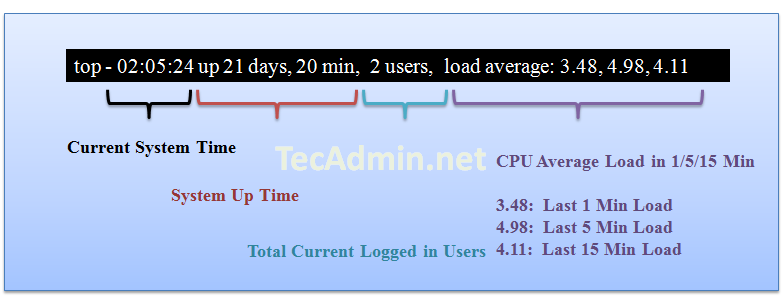
Result Row #1:

Row 1 results shows about server up time from last reboot, currently logged in users and cpu load on server. The same output you can find using linux uptime command.
read-top-command-result-1

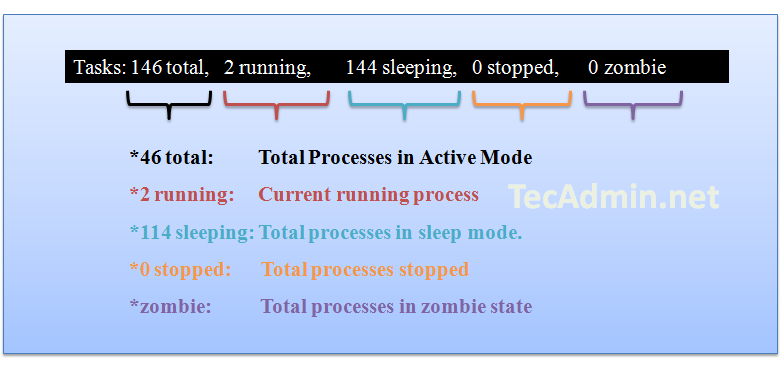
Result Row #2:

Row 2 shows the number of process running on server and there state.
read-top-command-result-2
Zombie process or defunct process is a process that has completed execution but still has an entry in the process table. This entry is still needed to allow the parent process to read its child’s exit status.

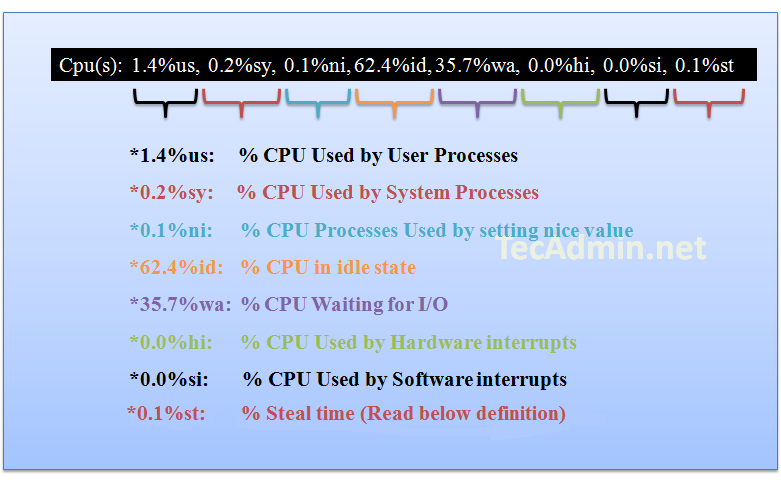
Result Row #3:

Row three shows the cpu utilization status on server, you can find here how much cpu is free and how much is utilizing by system.
read-top-command-result-3
Definition from access.redhat.com:
Steal time is the time that a virtual CPU waits for a real CPU while the hypervisor is servicing another virtual processor.

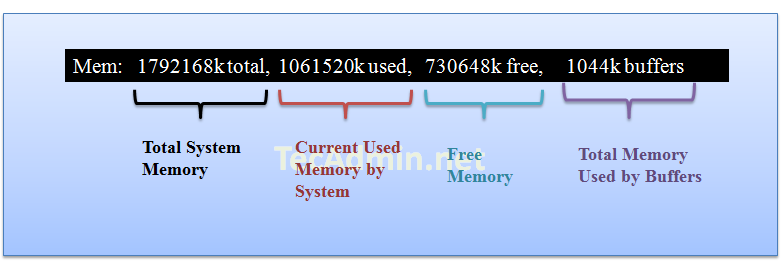
Result Row #4:

Row 4 shows the memory utilization on server, you can find here how much memory is used, the same results you can find using free command.
read-top-command-result-4

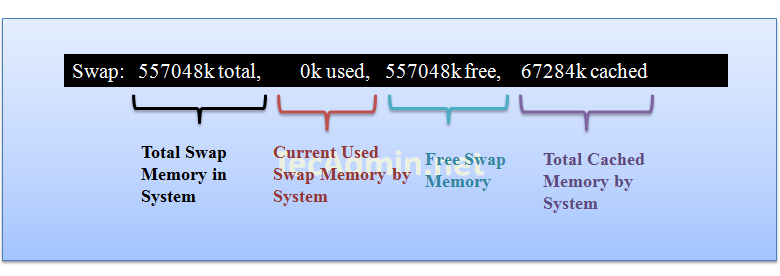
Result Row #5:

Row 4 shows the swap memory utilization on server, you can find here how much swap is being used, the same results you can find using free command.
read-top-command-result-5

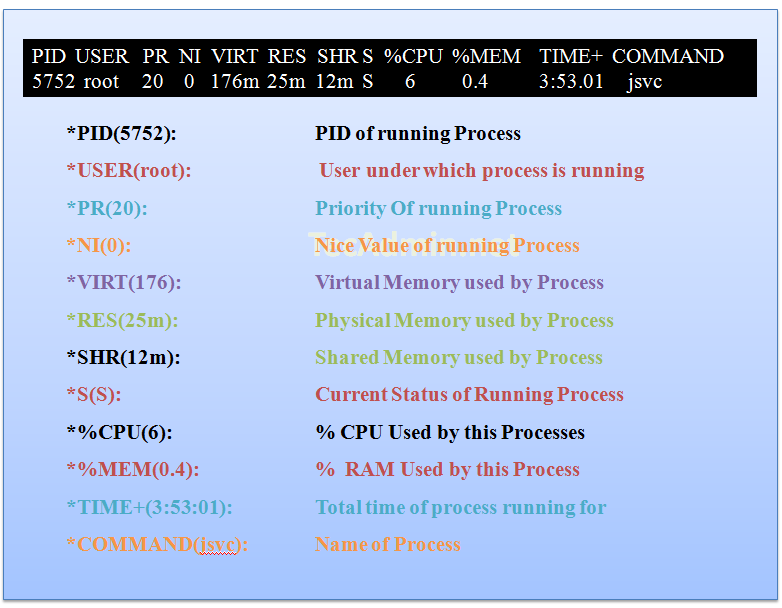
Result Row #6 ( Running Processes ):

In this steps you will see all running process on servers and there additional details about them like below.
read-top-command-result-6
If you want to sort output on basis of any fields, you can use following key combinations.
Press "SHIFT + F" and Select your choice below and press ENTER.

  A     ( PID = Process Id )
  b     (  PPID   = Parent Process Pid )
  d     (  UID= User Id )
  e     (  USER   = User Name )
  f     (  GROUP  = Group Name ) 
  g     (  TTY= Controlling Tty )
  h     (  PR = Priority )
  i     (  NI = Nice value )  
  j     (  P  = Last used cpu (SMP) )
  k     (  %CPU  = CPU usage )
  l     (  TIME  = CPU Time )
  n     (  %MEM  = Memory usage (RES) )
  o     (  VIRT  = Virtual Image (kb) )
  p     (  SWAP  = Swapped size (kb) )
  q     (  RES= Resident size (kb) )
  r     (  CODE  = Code size  (kb) )
  s     (  DATA  = Data+Stack size (kb) )
  t     (  SHR= Shared Mem size (kb) )
  w     (  S  = Process Status )
  x     (  COMMAND= Command name/line )


-- Srikanth Govada

Script to gather DEBUG data for SUN web server when HUNG in SOLARIS

#wshung.ksh

#!/bin/ksh -p

# Copyright 2008 Sun Microsystems, Inc. All rights reserved.
# Use is subject to license terms.
#
# Script for Gathering Debug Data for Web Server 6.0, 6.1 and 7.0 (and Proxy
# Server 4.0) on Solaris SPARC and x86
#
# Version: 1.3 - unknown
# 1.4 - Feb 2007 - verified support for 7.0, added netstat
# 2.0 - Apr 2007 - combo script incl. support for pre-Solaris 8,
# optional gcore
# 2.1 - May 2008 - Integrated pkg_app, command line pid entry, pid
# check, extra data collection, add Proxy 4.0
# 3.0 - Nov 2008 - Integrate pkgapp v3, modified command line
# pid check, added truss, modified proc tool order
# 3.1 - Mar 2009 - bug fix to command line pid check
#
# Check for a new version of this script:
# http://www.sun.com/bigadmin/scripts/indexSjs.html
# Obtain the Sun GDD documentation and/or check for new product coverage:
# http://www.sun.com/service/gdd/index.xml
#
# Please send all script BUGs and/or RFEs to the following address:
# Subject 'wshang bug/rfe' - gdd-issue-tracker@sun.com
# Please send all script BUGs and/or RFEs to the following address:
# Subject 'wshang feedback' - gdd-feedback@sun.com

#
# USAGE: Run the script with no arguments to see all Web processes running on
# the machine.
#

# The following four settings can be changed as necessary:

# Change this value to set the duration in secs between data collection rounds
DURATION=15

# Set the following variable to y or n to allow a gcore to be taken
CORECHOICE=y

# Set the following variable to y or n to allow the pkgapp script to run.
# Assumes the pkgapp script is in the same location as wshang script.
PKGAPP=y

# Set the following variable with your Case Number. If no case number has been
# opened but wish to use wshang.ksh to trap an issue, you can use your Company
# Name (no spaces) or all 1's. Once you get a Sun Case number, you can rename
# the resulting tar file before sending to Sun.
CASENUMBER=3-9395377381

############################################################
# Work starts here - no need to change anything below here #
############################################################

# prompt for response for different directory
resp=$1

# Ensure /usr/bin is in the path
PATH=/usr/bin:$PATH

# add the date to the results file
TIMESTAMP=`date "+%y%m%d-%H%M%S"`

# Check what version of Solaris is in use
SOLVER=$(uname -r | cut -c3-4)

echo "
This script collects 3 snapshots of the following information
at a ${DURATION} seconds interval against a web server process:
pstack
pfiles
prstat -L -a (will try 'top' on pre-Solaris 8 systems)
pflags
pmap -x
pldd
netstat -an
And collections 30 seconds of:
truss -feald -vall -wall -rall
";

# Check to see if user wants to place data in different location
echo "Data will be collected to the location /tmp/wshang by default."
echo "Data location should have enough disk space for large core files."
echo "Would you like to specify a different directory for data? "
echo "(y/n) "
read resp

if [ $resp = "y" ]; then
TMPDIR=$2
echo "Specify a directory: "
read TMPDIR
pid=$3
else
# The temporary directory where the results will be saved
TMPDIR=/tmp/wshang
pid=$2
fi

if [ -d $TMPDIR ]; then
echo " "
echo "$TMPDIR exists, may I delete it? (y/n)"
echo "WARNING: If your response is "y", $TMPDIR will be deleted!"
read resp
if [ $resp = "y" ]; then
rm -r -f $TMPDIR/*
fi
fi

# create the directory for data collection
mkdir -p $TMPDIR

#
# Mar 2009: Start interactive user inputs
#

echo " "
echo " "
echo "Enter your Sun case id or service request number: "
read CASENUMBER

# check if input was given
if [ -z $CASENUMBER ] ; then
CASENUMBER=11111111
fi

echo " "
echo " "
echo "Do you wish to collect a core file? (y/n) Default is yes."
read CORECHOICE

# check if input was given
if [ "$CORECHOICE" != "y" -a "$CORECHOICE" != "n" ]; then
CORECHOICE="y"
fi

echo " "
echo " "
echo "How many seconds do you wish to configure between proc tool data collection? Default is $DURATION seconds"
read DURATION

# check if input was given
if [ -z $DURATION ]; then
DURATION=15
fi

echo " "
echo $CORECHOICE

if [ "$CORECHOICE" == "y" ]; then
echo " "
echo " "
echo "The pkgapp is used by Sun to open your core file for analysis."
echo "Do you wish to collect pkgapp data? (y/n) Default is $PKGAPP "
read PKGAPP

# check if input was given
if [ "$PKGAPP" != "y" -a "$PKGAPP" != "n" ]; then
PKGAPP="y"
fi
fi

#
# If pid was not entered on the cmd line then list the running web server
# instances and prompt user to choose
#

if [ -z "$pid" ]; then

echo " "
echo " "
echo "The following is a list of web server processes:"
echo " "

# If Solaris 8 or greater
if (( $SOLVER > 7 )) ; then
echo "Solaris 8 or greater"
echo "Web Server 7.0/6.1 processes"
#ptree | grep ' webservd ' | awk '((NR % 2) == 1 ) {print}' | sed 1d
ptree | grep '^ [0-9]' | grep ' webservd '

echo "Web Server 6.0 processes"
#ptree | grep ns-httpd | awk '((NR % 2) == 1) {print}' | sed 1d
ptree | grep '^ [0-9]' | grep ' ns-httpd '

echo "Proxy Server 4.0 processes"
#ptree | grep ' proxyd ' | awk '((NR % 2) == 1) {print}' | sed 1d
ptree | grep '^ [0-9]' | grep ' proxyd '

else
echo "Solaris 7 or less"
# Less elegant. Note Proxy 4.x not supported < Solaris 8 ps -ef | grep -i https- fi echo " " echo " " echo "Enter the PID of the web server process to collect data on" echo "(Note that the correct PID for child webservd/ns-httpd process will not be listed correctly here if you have MaxProcs > 1 in your magnus.conf. Please manually find the pid you need to collect data against.):"
read pid

# End pid test
fi

# Check to see if the pid actually exists
ps -p $pid
if [ $? -ne 0 ]; then
echo "ERROR: Specified pid ($pid) does not exist"
exit 1
fi

# If Solaris less than 8
if (( $SOLVER < 8 )) ; then echo "Adding /usr/proc/bin to the path so the tools work" PATH=$PATH:/usr/proc/bin fi echo " " echo " " echo "Gathering data now..." echo " " # # Collect the information # Includes conditional check for Solaris 8 and greater to run prstat # for i in 1 2 3 do echo "Loop $i for $DURATION seconds..." echo " " echo "collecting pflags..." echo "*******************************" >> $TMPDIR/pflags.out.$i
date >> $TMPDIR/pflags.out.$i
pflags $pid >> $TMPDIR/pflags.out.$i

echo "collecting pmap -x..."
echo "*******************************" >> $TMPDIR/pmap.out.$i
date >> $TMPDIR/pmap.out.$i
pmap -x $pid >> $TMPDIR/pmap.out.$i

echo "collecting pldd..."
echo "*******************************" >> $TMPDIR/pldd.out.$i
date >> $TMPDIR/pldd.out.$i
pldd $pid >> $TMPDIR/pldd.out.$i

if (( $SOLVER > 7 )) ; then
echo "collecting prstat -L -a..."
echo "*******************************" >> $TMPDIR/prstat.out.$i
date >> $TMPDIR/prstat.out.$i
prstat -L -a -p $pid 1 1 >> $TMPDIR/prstat.out.$i
else
echo "collecting top..."
echo "*******************************" >> $TMPDIR/top.out.$i
date >> $TMPDIR/top.out.$i
top -d 1 -n 20 >> $TMPDIR/top.out.$i
fi

echo "collecting pstack..."
echo "*******************************" >> $TMPDIR/pstack.out.$i
date >> $TMPDIR/pstack.out.$i
pstack $pid >> $TMPDIR/pstack.out.$i

echo "collecting pfiles..."
echo "*******************************" >> $TMPDIR/pfiles.out.$i
date >> $TMPDIR/pfiles.out.$i
pfiles $pid >> $TMPDIR/pfiles.out.$i

echo "collecting netstat..."
echo "*******************************" >> $TMPDIR/netstat.out.$i
date >> $TMPDIR/netstat.out.$i
netstat -an >> $TMPDIR/netstat.out.$i

echo " "

# last round no need to sleep
if [ $i -eq 3 ] ; then
echo "collecting 30 seconds of truss..."
truss -feald -o $TMPDIR/truss.out -vall -wall -rall -p $pid &
sleep 30
pkill -9 truss
echo "done"
echo " "
break
fi

# sleep
sleep $DURATION
done

# In addition gcore the process based on variable set in script

if [ $CORECHOICE = "y" ] ; then
echo "Collecting gcore..."
gcore -o $TMPDIR/gcore.out $pid

# If Solaris 8 or greater only as p commands are only for pid
# on earlier versions
if (( $SOLVER > 7 )) ; then
pstack $TMPDIR/gcore.out.$pid > $TMPDIR/gcore_pstack.out
pmap $TMPDIR/gcore.out.$pid > $TMPDIR/gcore_pmap.out
pldd $TMPDIR/gcore.out.$pid > $TMPDIR/gcore_pldd.out

# Check if a pkgapp script run is required
if [ $PKGAPP = "y" ] ; then

# Firstly get path to the webservd binary file for use by pkgapp

# This will do 7.0
SERVER_ROOT=`pmap $pid | grep webservd | grep lib`

# This will do 6.1
if [ -z "$SERVER_ROOT" ]; then
SERVER_ROOT=`pmap $pid | grep webservd | grep bin`
fi

# Need a check for WS 6.0 and ns-httpd
if [ -z "$SERVER_ROOT" ]; then
SERVER_ROOT=`pmap $pid | grep ns-httpd | grep bin/https/bin`
fi

# This will do Proxy 4.0
if [ -z "$SERVER_ROOT" ]; then
SERVER_ROOT=`pmap $pid | grep proxyd | grep bin/proxy/bin`
fi

SERVER_ROOT=`echo $SERVER_ROOT | cut -f4 -d' '`
echo $SERVER_ROOT

# usage:./pkgapp -c -p ./pkgapp -c $pid -p $SERVER_ROOT -s $TMPDIR/pkgapp_data
fi
fi

else
echo "No gcore requested"
fi

# End of gcore section

# Collect some other useful data

showrev -p > $TMPDIR/showrev.out
uname -a > $TMPDIR/uname.out
cat /etc/release > $TMPDIR/release.out
ulimit -a > $TMPDIR/ulimit

# Gather everything up
echo "Creating a tar file of the results..."
cd $TMPDIR 1>/dev/null 2>&1
tar cvfh ${CASENUMBER}-gdd-wshang-${TIMESTAMP}.tar *

# Try and gzip the result - might not be installed on Solaris 7 and 2.6
gzip ${CASENUMBER}-gdd-wshang-${TIMESTAMP}.tar

echo " "
echo "The tar file has been created...."
echo " "
echo "Please send the file ${TMPDIR}/${CASENUMBER}-gdd-wshang-${TIMESTAMP}.tar.gz to"
echo "Sun Microsystems at https://supportfiles.sun.com/upload"
echo "Choose cores as the destination."
echo " "

# Automatically change permissions if required (uncomment this)
# chmod 777 ${TMPDIR}/${CASENUMBER}-gdd-wshang-${TIMESTAMP}.tar.gz

# end


#explore advanced UNIX techniques to troubleshoot performance and instance hung problems.

pstack_truss_doc


-- Srikanth Govada