<07-Aug-2013 13:52:53 o’clock UTC> <Notice> <Security> <BEA-090171> <Loading the identity certificate and private key stored under the alias soa from the JKS keystore file /u01/app/oracle/admin/domain/dev/config/fmwconfig/soa.jks.>
<07-Aug-2013 13:52:53 o’clock UTC> <Error> <WebLogicServer> <BEA-000297> <Inconsistent security configuration, java.lang.RuntimeException: Cannot convert identity certificate>
<07-Aug-2013 13:52:53 o’clock UTC> <Error> <Server> <BEA-002618> <An invalid attempt was made to configure a channel for unconfigured protocol “Cannotconvert identity certificate”.>
<07-Aug-2013 13:52:53 o’clock UTC> <Error> <WebLogicServer> <BEA-000297> <Inconsistent security configuration, java.lang.RuntimeException: Cannot convert identity certificate>
<07-Aug-2013 13:52:53 o’clock UTC> <Error> <Server> <BEA-002618> <An invalid attempt was made to configure a channel for unconfigured protocol “Cannotconvert identity certificate”.>
Root Cause : This issue could be because of many reasons
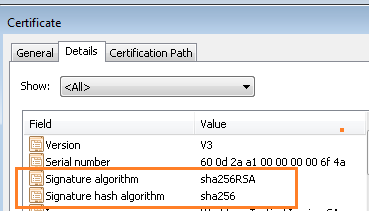
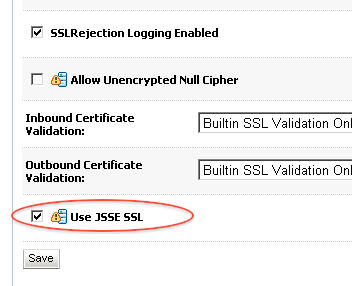
1. SHA as HASH ALgorithm : If while signing the Certificate, signature hash algorithm used by CA is SHA256 (to find Algorithm, click certificate and thenDetails) then this is supported only on WebLogic 10.3.3 or higher version (for prior version of WebLogic use SHA1). For WebLogic 10.3.3 or higher with SHA256, select option Use JSSE SSL in SSL tab
Fix: Use option Use JSEE SSL
Servers -> [name_of_the_weblogic_server_for_which_ssl_is_configured] ->Configuration -> SSL (sub tab) : Click on Advanced at bottom of the Page , select check box Use JSSE SSL and then save . Activate Change and restart WebLogic Server.
2. Other reason could be use of wildcard (*.domain_name) in SSL certificate .
Reference
- 664243.1 E-WL: WebLogic Fails to Listen on SSL Port after Installing a WildCard Certificate or a SHA2 Certificate. Logs Message: “Cannot convert identity certificate”
Thanks,
Srikanth Govada
